
Pallet statuses come from the pallet status history. The portal maps those events into the names you see on the list and on the pallet timeline.
Read the latest event on the Pallet details. That barcode timeline is the place to follow progress.
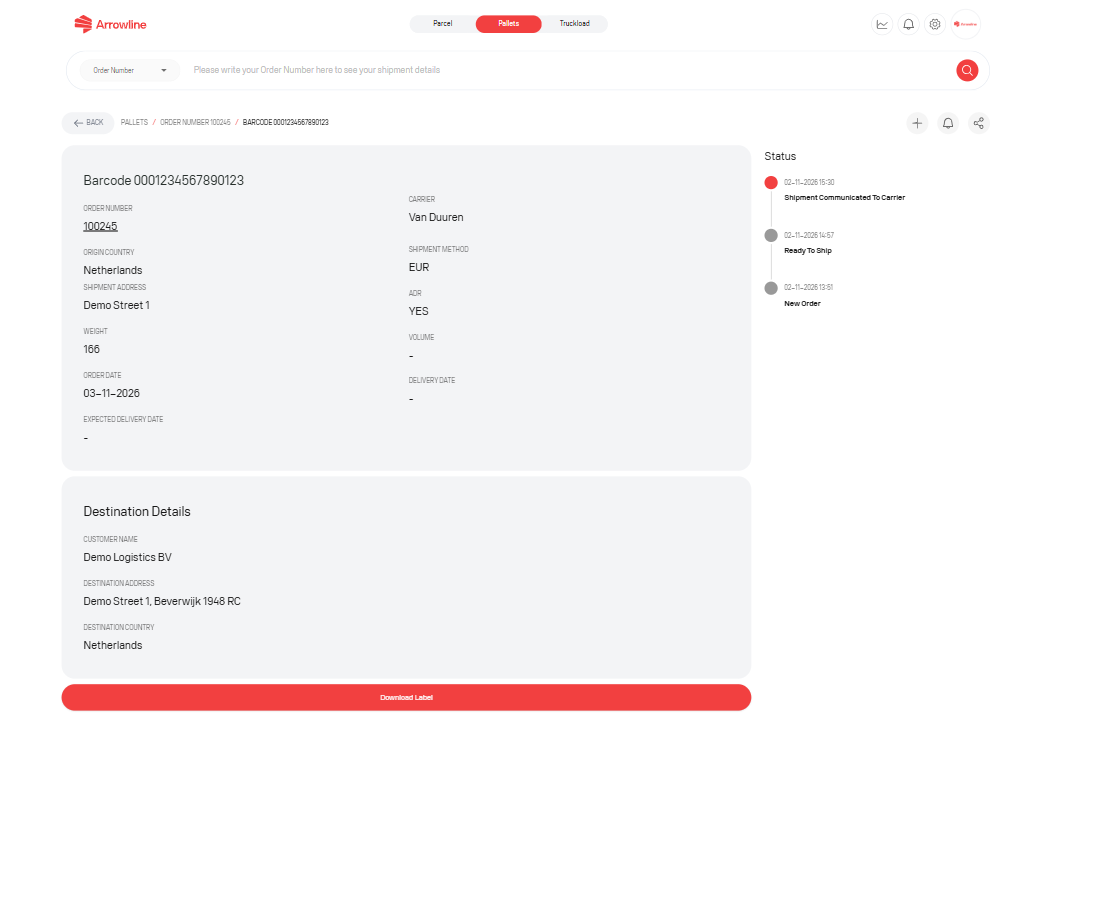
Planning statuses
These statuses are used in the signed-in planning workflow:
| Status | What it means in the portal |
|---|---|
| Incoming | The order has no latest status yet and appears on the incoming list |
| Ready To Ship | You confirmed the shipment in Incoming Orders |
| Shipment Communicated to Carrier | The shipment has been passed to the carrier. Revert can be blocked after this point |
| Order Cancelled | The order is cancelled |
Movement and delivery names you may see
These names can appear on the list and on the pallet timeline:
| Status | What it means in the portal |
|---|---|
| Picked Up | The pallet has been collected |
| Arrival HUB | The pallet has arrived at a hub |
| In Transit | The pallet is moving between locations |
| Out for Delivery | The pallet is out for the final delivery |
| Delivered | The pallet has been delivered |
| Delivered, Partially Missing | The pallet was delivered with part of the goods missing |
| Delivered on Appointment | The pallet was delivered on an agreed appointment |
| Delivered, Partly Delivered | The pallet was delivered only in part |
| Damaged | The pallet or goods were reported as damaged |
| Refused | The delivery was refused |
| Address closed | The delivery address was closed |
| Returned | The pallet is being returned or has been returned |
| On hold | The shipment is on hold |
| Missing in network | The pallet is missing in the carrier network |
Statuses are not support cases
A pallet can show Delivered while a claim is still open. A planning status can look normal while a ticket is being handled.
If the latest event is missing or looks wrong, do not recreate the shipment. Follow A shipment status is not updated and include the order number and barcode.